
So did your old keyboard just ruin your gaming ambitions or did it just type its last letter? Or maybe it still works fine for what it is, but you surely deserve an upgrade. Whatever the reason, is there any part of your computer more hands-on than your keyboard? So here's categorised list of the best keyboards you could use. Read on to find out what keyboard will suit your needs.
Best Keyboard for Work
Das Keyboard 4 Professional

The Das Keyboard 4 Pro is probably the best looking mechanical keyboards you could get your hands on. The Das Keyboard 4 Pro features a 104-key layout with an oversized volume knob, dedicated play, next track, previous track, sleep and mute buttons which may make you feel just at home even in an office scenario. The keyboard also has a built-in USB 3.0 hub with 2 ports as extras. I'll recommend you to buy one with the brown Cherry MX switches, as the blue ones are a bit louder which may not be good for a workplace.
Best Gaming Keyboard
Razer BlackWidow Chroma

The Razer BlackWidow Chroma is a sleek and durable keyboard designed specifically for gamers. The keyboard features Razer's custom-designed switches, called Kailh switches which feature the same tactile click and actuation force (50cN) as the Cherry MX Blues, but a higher actuation point making it easier to double-tap keys, which is good for gaming. The downside may be that they aren't much comfortable when typing. To go with the latest trend, Razer not only implements RGB lighting on its BlackWidow Chroma but also offers special editions with gorgeous game-specific custom paint jobs.
Best Mac Keyboard
Apple Keyboard with numeric keypad

The little wireless Apple keyboard is great, but if you're more of a power user, you could consider this larger model with a full-size numeric keypad. It includes some extra features as well such as a set of navigation keys like Home and End to allow you to quickly scroll through web pages, built-in USB 2.0 ports for connecting a mouse or other peripherals.
Best Keyboard for Programmers
Happy Hacking Keyboard Professional 2
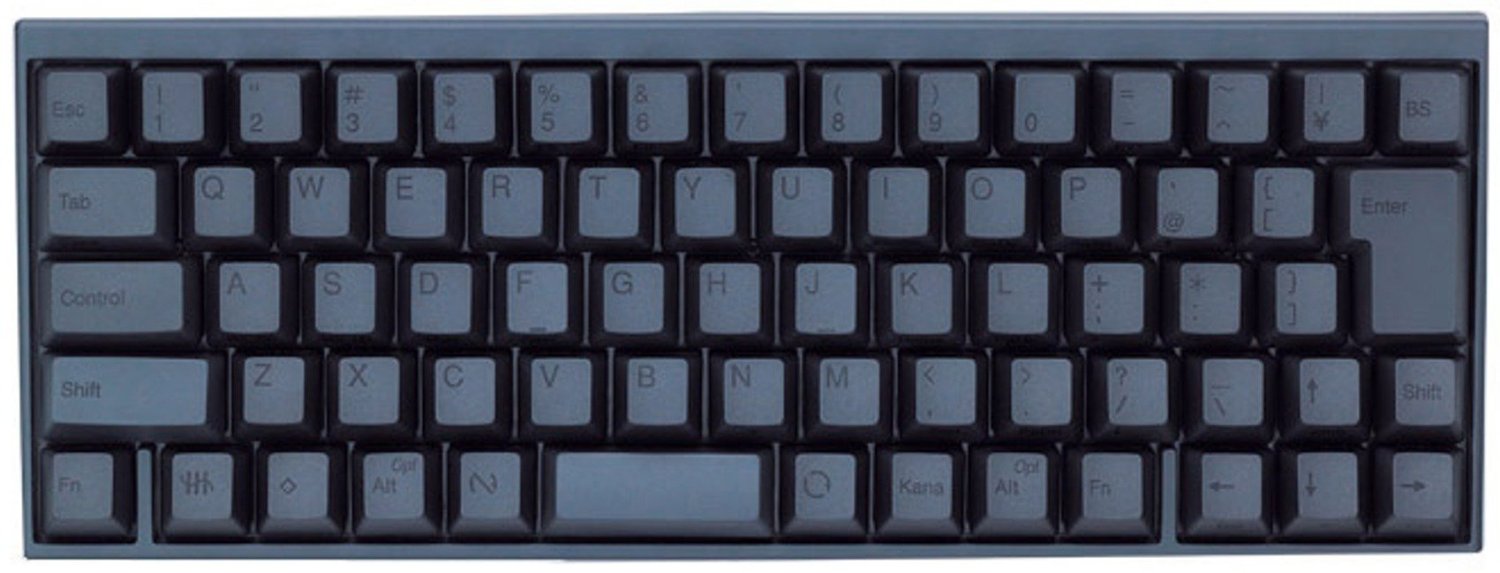
The Happy Hacking Keyboard Professional 2 is a minimal mechanical keyboard that could be used only for typing, like, literally just typing! It's so minimal that, it not only drops out the Numeric Keypad but also the navigation keys and the function keys. Given the name, the HHKB Pro 2 is primarily designed with programmers in mind, specifically, vim and emacs users. It comes in an uncommon 60 key layout and is available with lettered or blank keys. For add-ons, the keyboard also has a 2 port USB hub on the back.
Best Living Room Keyboard aka HTPC Keyboard
Logitech K830 Illuminated Living Room Keyboard

Home theatre PCs are probably the most flexible way of enjoying a wide variety of content sitting on the couch in your living room. Which means that you either need to use some kind of remote control software or may need to keep a keyboard and mouse handy. Enter, Logitech's Illuminated K830 Keyboard. The Logitech K830 Illuminated Living Room Keyboard is a full-sized keyboard with a built-in touchpad, along with left and right mouse buttons as well as media keys for volume control (mute, volume +, and volume -). Its most important feature is it backlit keys that automatically adapt to ambient light and fade out when not in use. This not only saves battery but also stops the light from hitting your eyes when watching your favourite movie.
Best Keyboard for Bloggers
Topre RealForce 87U TKL

The Realforce 87u uses arguably the best key switches in the world, the capacitive Topre switches. Topre switches are technically a hybrid switch, which is part rubber dome, and part mechanical spring. The 87u is a compact "tenkeyless" keyboard with 87 keys with no numeric keypad. The keyboard offers a great combination of a smooth typing feel with high-quality stock PBT keycaps. But mind you all of this comes at a very high price!
Follow Me on Twitter>>>> @iamBhavish
And like us on Facebook>>> The Gud1


