Showing posts with label Recovery. Show all posts

Thursday, May 2, 2013

[BSNL Password Decryptor] Tool to Recover the Login Password of BSNL modem/router


BSNL Password Decryptor is a free desktop tool to instantly recover the Login Password of BSNL modem/router.

If you have lost login authentication password of your BSNL modem and you have backup configuration file then you can use this tool to quickly recover your password.

It supports dual mode of password recovery. You can either enter the encrypted BSNL password directly or specify the BSNL Modem's backup configuration file. In second case, it will automatically detect the login password from config file and decrypt it instantly.


Note that it currently supports limited number of BSNL modems (mainly UT-300 Series). Hence it may or may not work with other models.

This can be very handy tool for all Network Administrators as well as penetration testers.
It is successfully tested on both 32 bit & 64 bit windows systems starting from Windows XP to Windows 8

Wednesday, March 27, 2013

[DLink Password Decryptor] Tool to recover the Login Password of D-Link modem/router


DLink Password Decryptor is a free desktop tool to instantly recover the Login Password of D-Link modem/router.

If you have lost login authentication password of your D-link modem and you have backup configuration file then you can use this tool to quickly get back your password.

It supports dual mode of password recovery. You can either enter the encrypted D-link password directly or specify the D-Link Modem's backup configuration file. In second case, it will automatically detect the login password from config file and decrypt it instantly.

Note that it is tested with limited number of D-link modems including latest model DSL-2750U. Hence it may or may not work with other models.

This is very handy tool for all Network Administrators as well as penetration testers.
It is successfully tested on both 32 bit & 64 bit windows systems starting from Windows XP to Windows 8

Screenshots

Screenshot 1: DLink Password Decryptor is showing the recovered Password from the encrypted D-Link Login Password


Screenshot 2: Showing Password recovered from the D-Link backup configuration file.

Download DLink Password Decryptor v1.0 
License  : Freeware
Platform : Windows XP, 2003, Vista, Windows 7, Windows 8

Friday, March 22, 2013

[Hashcat v0.44] Advanced Password Recovery


Features

  • Multi-Threaded
  • Free
  • Multi-Hash (up to 24 million hashes)
  • Multi-OS (Linux, Windows and OSX native binaries)
  • Multi-Algo (MD4, MD5, SHA1, DCC, NTLM, MySQL, ...)
  • SSE2 accelerated
  • All Attack-Modes except Brute-Force and Permutation can be extended by rules
  • Very fast Rule-engine
  • Rules compatible with JTR and PasswordsPro
  • Possible to resume or limit session
  • Automatically recognizes recovered hashes from outfile at startup
  • Can automatically generate random rules
  • Load saltlist from external file and then use them in a Brute-Force Attack variant
  • Able to work in an distributed environment
  • Specify multiple wordlists or multiple directories of wordlists
  • Number of threads can be configured
  • Threads run on lowest priority
  • Supports hex-charset
  • Supports hex-salt
  • 30+ Algorithms implemented with performance in mind
  • ... and much more


Attack-Modes

  • Straight *
  • Combination *
  • Toggle-Case
  • Brute-Force
  • Permutation
  • Table-Lookup

type: feature
file: hashcat-cli
desc: added mode -m 9999 = Plaintext
trac: #45

type: feature
file: hashcat-cli
desc: added mode -m 5500 = NetNTLMv1 + ESS
trac: #96

type: feature
file: kernels
desc: added -m 5700 = Cisco-IOS SHA256
cred: philsmd

type: change
file: hashcat-cli
desc: changed the hash-format for NetNTLMv1 and NetNTLMv2 to .lc format
cred: #98

type: bug
file: hashcat-cli
desc: fixed bug in 32 bit version, did not crack -m 1800 sha512crypt
trac: #92

type: bug
file: hashcat-cli
desc: fixed bug in NetNTLMv2 parser
trac: #95

[Juniper Password Decryptor] Tool to Decode and Recover Juniper $9$ Passwords


Juniper Password Decryptor is a free desktop tool to instantly decode and recover Juniper $9$ Passwords.

Juniper Router allows you to configure 2 types of passwords,
  • Juniper $1$ Password: Here MD5 hash of the password is stored. It starts with $1$ and requires brute-force technique to recover the password
  • Juniper $9$ Password: These passwords are encoded using Juniper's private encryption algorithm. Password hash starts with $9$ text & can be decrypted instantly.

You can use Juniper Password Decryptor tool to quickly decrypt these Juniper $9$ passwords.

It supports dual mode of password recovery. You can either enter the encrypted Juniper $9$ password directly or specify the Juniper router configuration file. In second case, it will automatically detect the $9$ password from config file and decrypt it instantly.


This is very handy tool for all Administrators as well as penetration testers.
It is successfully tested on both 32 bit & 64 bit windows systems starting from Windows XP to Windows 8.


Screenshots


Screenshot 1: Juniper Password Decryptor is showing the recovered Password from the encrypted Juniper $9$ Password


Screenshot 2: Showing Password recovered from the Juniper configuration file.

Download Juniper Password Decryptor v1.0
License  : Freeware
Platform : Windows XP, 2003, Vista, Windows 7, Windows 8

Sunday, March 10, 2013

[SHA256 Salted Hash Kracker]Tool to Crack your Salted SHA256 Hash


SHA256 Salted Hash Kracker is the free tool to crack and recover your lost password from the salted SHA256 hash.


These days most websites and applications use salt based SHA256 hash generation to prevent it from being cracked easily using precomputed hash tables such as Rainbow Crack. In such cases, 'SHA256 Salted Hash Kracker' will help you to recover your lost password from salted SHA256 hash.
It uses dictionary based cracking method which makes the cracking operation simple and easier. By default small dictionary file is included but you can find good collection of password dictionaries (also called wordlist) here & here.

Though it supports only Dictinary Crack method, you can easily use tools like Crunch, Cupp to generate brute-force based or any custom password list file and then use it with 'SHA256 Salted Hash Kracker'.

It also allow you to specify the salt position either in the beginning of password [ sha256(salt+password)] or at the end of the password [sha256(password+salt)]. In case you want to perform normal SHA256 hash cracking without the salt then just leave the Salt field blank.

It works on both 32-bit & 64-bit Windows platforms starting from Windows XP to Windows 8.


Saturday, December 22, 2012

[WiFi Password Decryptor] Free Wireless Password Recovery Software


WiFi Password Decryptor is the FREE software to instantly recover Wireless account passwords stored on your system.

It automatically recovers all type of Wireless Keys/Passwords (WEP/WPA/WPA2 etc) stored by Windows Wireless Configuration Manager.
For each recovered WiFi account, it displays following information
  • WiFi Name (SSID)
  • Security Settings (WEP-64/WEP-128/WPA2/AES/TKIP)
  • Password Type
  • Password in clear text
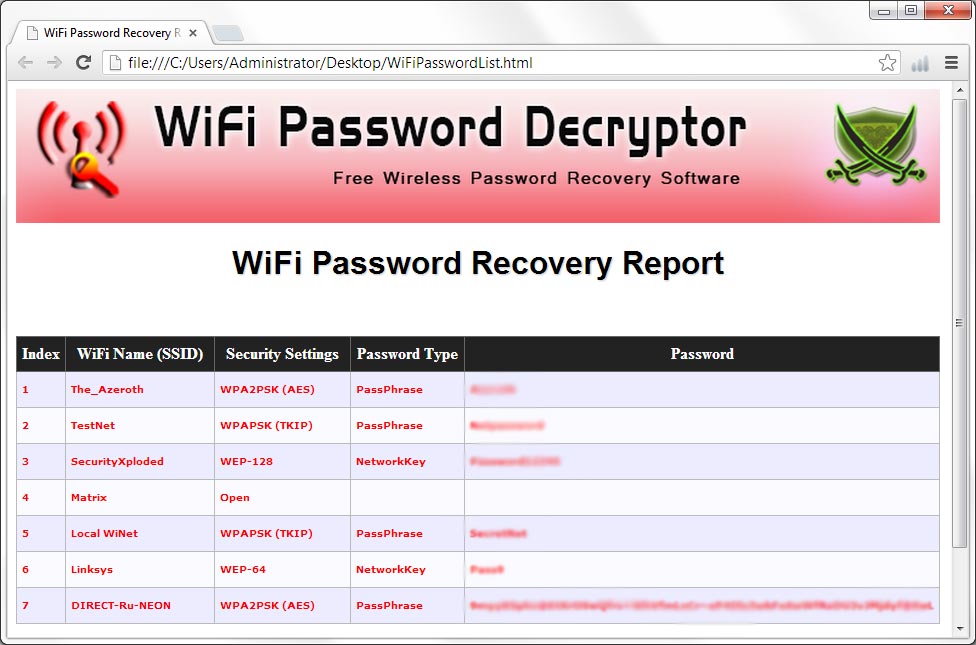
After the successful recovery you can save the password list to HTML/XML/TEXT file. You can also right click on any of the displayed account and quickly copy the password.
Under the hood, 'WiFi Password Decryptor' uses System Service method (instead of injecting into LSASS.exe) to decrypt the WiFi passwords. This makes it more safer and reliable. Also it makes us to have just single EXE to work on both 32-bit & 64-bit platforms.

It has been successfully tested on Windows Vista and higher operating systems including Windows 8.

How to Use?

WiFiPasswordDecryptor is easy to use with its simple GUI interface. 

Here are the brief usage details
  • Launch WiFiPasswordDecryptor on your system
  • Next click on 'Start Recovery' button and all stored WiFi account passwords will be recovered & displayed as shown in screenshot 1 below.
  • You can right click on any of the displayed account to quickly copy the password
  • Also can generated detailed password recovery report in HTML/XML/Text format by clicking on 'Export' button and then select the type of file from the drop down box of 'Save File Dialog'.
Note that you need to have administrative privileges to run this tool.

Limitations

This tool can recover the WiFi Passwords configured by Windows Wirelss Configuration Manager only. Also it does not work on older operating systems like Windows XP, 2003.It works well with Vista & all the higher versions.
Screenshots

Here are the screenshots of WiFiPasswordDecryptor
Screenshot 1: WiFi Password Decryptor showing all the Recovered WiFi account Passwords.
WiFiPasswordDecryptor showing recovered passwords


Screenshot 2: Detailed HTML report of all the recovered WiFi account Passwords
WiFiPasswordDecryptor

Download WiFi Password Decryptor

Tuesday, November 20, 2012

[Network Password Decryptor v3.0] Tool to Recover Network Passwords

Network Password Decryptor is the free tool to instantly recover network passwords stored in the 'Credential Store' of Windows.

Windows 'Credential Store' provides the framework for storing various network authentication based passwords in secure encrypted format.
 
 Not only Windows uses it to store network authentication passwords, but also other applications such as Outlook, Windows Live Messenger, Remote Destktop, Gmail Notifier etc uses it for storing their login passwords. These network passwords are saved only when the user has selected 'Remember Password' option during login time.

These network passwords are stored in encrypted format and even administrator cannot view these passwords. Also some type of passwords cannot be decrypted even by administrators as they require special privileges. In this context, NetworkPasswordDecryptor makes it easy to detect and decrypt all these stored network passwords from Credential Store.

Current version v3.0 supports network password recovery from Windows 8.

NetworkPasswordDecryptor works on wider range of platforms starting from Windows XP to latest operating system, Windows 8.

Screenshots
Here are the screenshots of NetworkPasswordDecryptor
Screenshot 1: NetworkPasswordDecryptor showing all the recovered passwords from Windows 8.

Screenshot 2: Report showcasing all the recovered network passwords on Windows 8 system